Independent fan tool. Check estimates against the game before spending resources.
Updated
Eight messages you can copy and adapt
These plain-text examples are written for common alliance situations. Replace the bracketed placeholders, confirm the time and instructions, then paste into chat and inspect it before sending. Copying here does not send anything to Kingshot.
Rally call
Use when a rally leader has confirmed the target and timing. Replace every bracketed field. Troop and hero instructions come from your leader, not from this generic template.
RALLY: [target]
Launch: [HH:MM] server time
Leader: [name] | Location: [coordinates]
Join with: [leader-approved setup]
Please be ready before launch. Ask an officer if unsure.
Bear Hunt reminder
Send before your scheduled hunt. State the actual start time and your alliance’s rally instructions; avoid assuming the same setup suits every player.
BEAR HUNT at [HH:MM] server time
Be online [number] minutes early.
Rally leaders: [names or instructions]
Joiners: follow [officer]’s hero and troop instructions.
Check your march slots before the start.
Event preparation
Separate preparation from spending. Name the event day and eligible action so members do not use materials on the wrong day.
[EVENT NAME] — [day or phase]
Starts: [date, HH:MM server time]
Today’s scoring action: [confirmed action]
Prepare: [resources or speedups]
Wait for the phase to open before spending. Check your in-game rules.
Welcome a new member
Keep this short and give newcomers one person to contact. Link only channels your alliance actually uses.
Welcome to [alliance], [name]!
Please read our pinned rules and set your alliance tag.
Main event times: [times, server time]
Questions or schedule conflicts? Message [officer].
Tell us which events you can join so we can plan together.
Alliance recruitment
Fill in honest requirements and event times. Do not promise rewards or transfer eligibility you cannot confirm.
[ALLIANCE] in Kingdom [number] is recruiting.
We focus on: [events / teamwork / casual play]
Main event times: [server times]
Requirements: [actual requirements]
Languages: [languages]
Message [contact] with your play times if interested.
Gathering reminder
State the specific territory or resource rule. Do not imply your local agreement is a universal game rule.
GATHERING REMINDER
Please use [approved area or resource tiles].
Our current agreement: [brief rule]
Before taking a disputed tile, contact [officer].
If there is a problem, share coordinates privately with an officer.
Ceasefire notice
Use only for an agreement your officers have confirmed. Include its time boundary and whom to contact before acting.
CEASEFIRE: [alliances or area]
Effective: [start] to [end], server time
Do not start attacks in the agreed area.
If you see a possible breach, send details to [officer].
Wait for officer guidance before responding.
Post-event recap
A short recap makes the next event easier to organise. Describe observed results and one improvement without blaming individual players.
Thank you for joining [event]!
Result: [confirmed outcome]
What worked: [one useful observation]
Next time: [one clear improvement]
Next event: [date and server time]
Send feedback privately to [officer].
Before you send
Replace every [placeholder], including coordinates and contact names.
Use server time and include the date when a message could be read tomorrow.
Use instructions your officers have confirmed. Do not invent universal troop ratios or hero requirements.
Check line breaks after pasting on your phone. Remove decorative symbols if they make the message harder to read.
You can select and copy the text manually if your browser blocks clipboard access. Open the Message Templates tool for additional layouts and chat previews.
See the tool in action
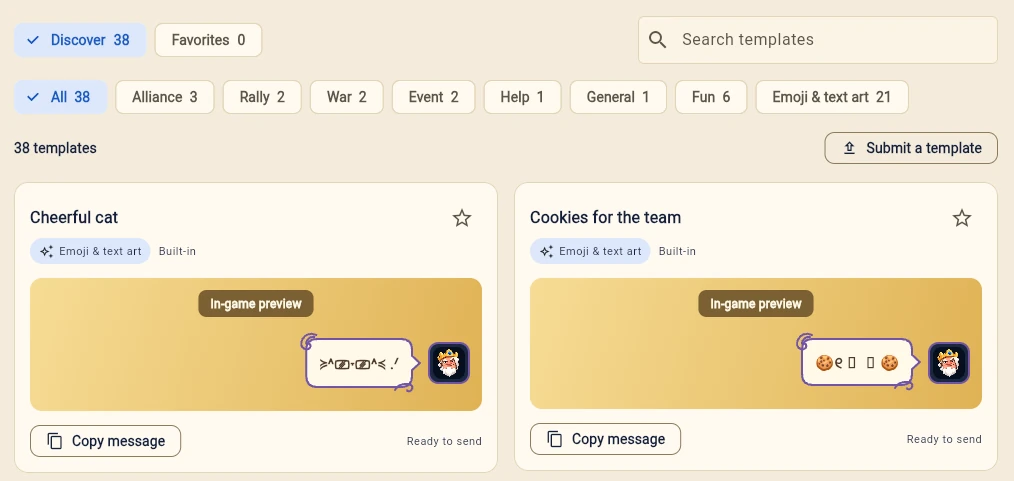
Templates are grouped by occasion, and each one shows an in-game chat preview before you copy it.
Choose a message for the occasion
Browse the available templates for a message that fits your alliance conversation. The page shows read-only chat previews so you can inspect spacing and symbols before copying. Choose a template for its meaning as well as its appearance.
Copy, then check the in-game preview
Use the copy action and paste the message into Kingshot chat. Fonts, device widths and supported symbols can change the result, so check the pasted text before sending it. A website preview is a guide to the intended layout, not a guarantee of identical rendering on every phone.
Keep alliance messages clear
Make sure the final message names the correct event, time and instructions. Do not copy private player information into a public channel. KS Companion does not send a chat message on your behalf: you decide where to paste it and when to send it.
Messages every alliance needs
Most alliance chat falls into a few patterns: a rally call with a time and target, a reminder before a timed event, a welcome for new members, rules for gathering and territory, and a thank-you after a good result. A clear template for each saves time when you are leading an event and makes instructions easier to follow for members whose first language differs from yours.
Writing a clear rally or event message
Lead with the action and the time, then the details. State the time in server time so members in other time zones are not confused, name the target or coordinates, and say who should join. Keep it short enough to read on a phone in one glance, and put the most important line first so it shows in the chat preview.
Formatting that survives chat
Symbols and spacing that look neat on a website can wrap differently in game chat, especially on narrow phones. Prefer short lines, avoid relying on exact alignment, and test a new template in a private or officer channel before posting it to the whole alliance. Keep a plain-text version for members whose devices do not show decorative symbols.